
I’ve been using Windows Hello face unlock on my desktop for years, and it’s one of those things you don’t realise how much you rely on until it’s gone. You sit down at the machine, look at the camera, and you’re in. No faffing about with passwords, no keyboard mashing while half-asleep. It just works.
On Linux? Not so much.
There are a few attempts — Howdy, for example — but they tend to assume you can install packages, start daemons, and modify /usr. Which is fine if you’re on Ubuntu or something, but completely breaks the model of immutable distros like Fedora Silverblue, Kinoite, Bluefin, or Bazzite. Those systems have a read-only /usr, and while you could layer packages with rpm-ostree, that’s not really the point — the whole appeal is that the system stays clean and atomic. I’ve been using Bluefin for a while now, and really like it. But recently it moved to bootc instead of rpm-ostree, and that’s made layering packages like Howdy even more difficult.
So I built something that doesn’t need any of that.
What it does
authFace gives you Windows Hello–style IR camera face authentication on Linux, integrated through PAM. It works for:
- Lock screen (GNOME via
gdm-password, Sway viaswaylock) sudo— typesudo trueand it triggers the IR camera instead of asking for a password- Any other PAM service you want to add it to
If face auth fails, times out, or there’s no camera, it falls through to the normal password prompt. So you’re never locked out.
Why this is different
The key thing about authFace is that it doesn’t install anything into /usr. No packages, no daemons, no systemd units, no D-Bus services. The whole core authentication binary is a static musl build — roughly 20 MB, zero runtime dependencies. You copy it to /usr/local/bin, and it runs on any Linux system.
Everything lives in:
/usr/local/for binaries and models~/.local/for the optional GUI/etc/pam.d/for PAM integration (which is writable even on immutable distros)
This means you can deploy it on Bazzite, Bluefin, Silverblue, Kinoite etc — without touching rpm-ostree layer. The system stays clean. You can uninstall everything and be back to where you started.
How it works (briefly)
When PAM triggers authentication (say, for sudo or the GNOME lock screen), it calls pam_exec.so, which runs the face-auth binary. That binary:
- Opens the IR camera via V4L2 (raw GREY format — same as Windows Hello cameras)
- Captures a frame with a 5-second timeout (so a hung camera doesn’t lock you out)
- Runs face detection using an ONNX model (RetinaFace-derived)
- Extracts a 512-dimension embedding using MobileFaceNet (
w600k_mbf.onnxfrom InsightFace, MIT licensed) - Compares it against your enrolled embeddings using cosine similarity
- Exits 0 if the match is above threshold (default 0.6), or exits 1 to fall through to password
The whole thing takes about two seconds from camera poll to authenticated. Not instant, but close enough that it doesn’t interrupt the flow.
The GUI
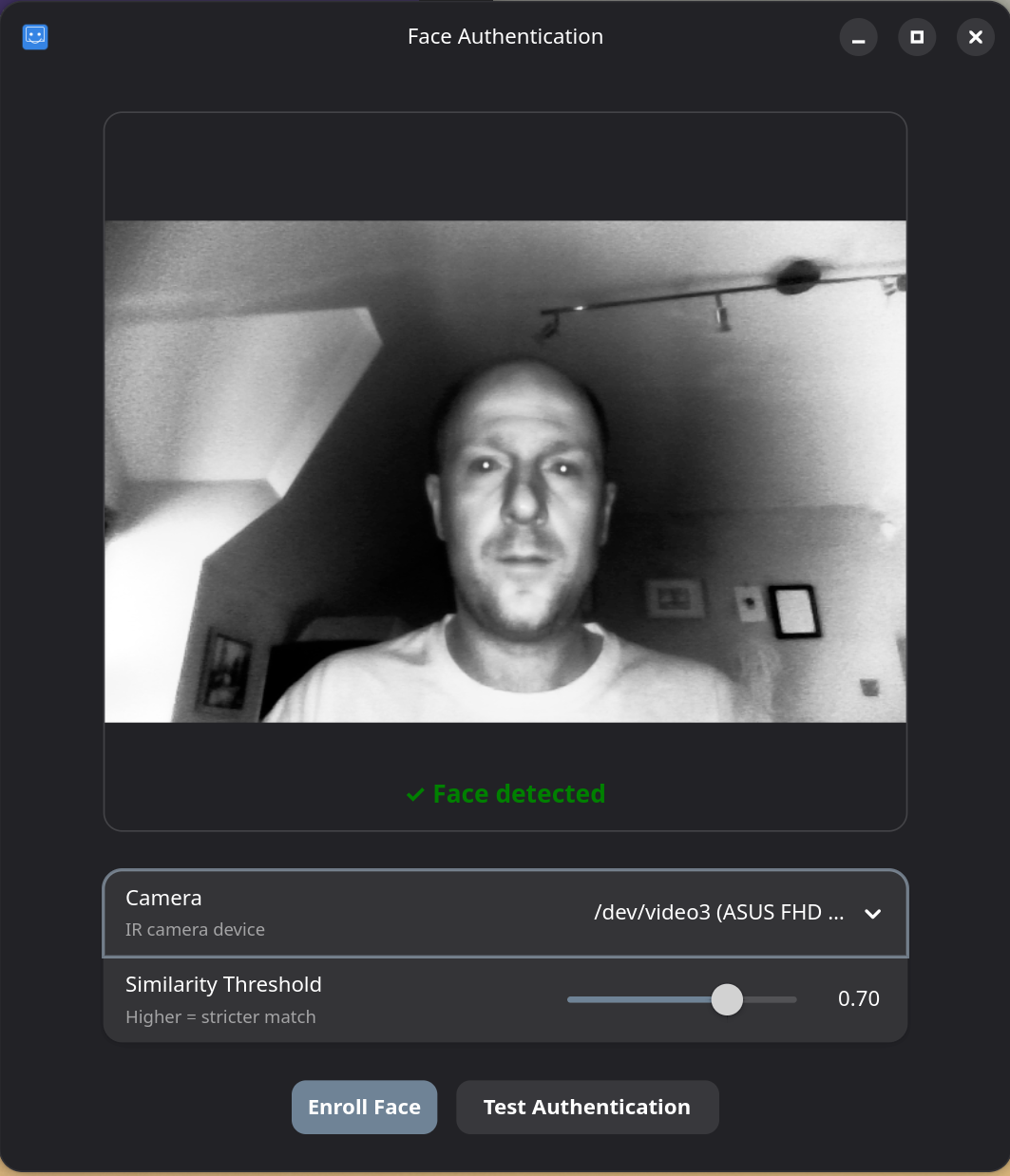
There’s an optional GTK4/libadwaita settings panel you can install separately. It gives you:
- Live IR camera preview with face-detection overlay
- Camera picker (if you have multiple cameras)
- Threshold slider to adjust how strict the matching is
- Enroll and test buttons
It’s not required — you can do everything from the command line — but it makes enrollment much less fiddly. The GUI itself installs to ~/.local/ on immutable systems, so it doesn’t touch /usr either.
Requirements
You need a Windows Hello–compatible IR camera that exposes raw GREY format via V4L2. My webcam is a Shinetech ASUS FHD — it works fine. Most Windows Hello cameras should work, but RGB-only cameras won’t cut it since the models are trained on IR data.
On the software side, you need PAM with pam_exec.so (standard on all distros) and that’s about it for the core auth. The GUI needs GTK4 + libadwaita runtime libraries, which come pre-installed on GNOME-based systems anyway.
Building and deploying
Deploying is simple -there’s a deploy script, a deploy-gui script, and an uninstall script. Run deploy.sh then deploy-gui.sh if you want the gui (if not, just run face-enroll –user <username> to enroll your face).
If you want to build from source, you need Rust with the x86_64-unknown-linux-musl target for the core binary. On immutable distros, I usually do this inside a distrobox container:
distrobox create --image docker.io/library/fedora:40 --name authface-devdistrobox enter authface-devsudo dnf install -y rust cargo gcc gcc-c++ musl-gcc cmake gtk4-devel libadwaita-develcd ~/Projectsgit clone https://github.com/pfalkingham/authFace.gitcd authFacecargo build --release --target x86_64-unknown-linux-musl -p face-auth -p face-enroll
Then exit the container and run sudo ./deploy.sh on the host. The deploy script handles everything: installs binaries, downloads the ONNX model from InsightFace (with SHA-256 verification), patches PAM files, and compiles a SELinux policy module if needed.
SELinux
On Fedora-based systems with SELinux enforcing, there’s one gotcha: the GNOME lock screen runs in the xdm_t domain, which can’t access video devices by default. The deploy script installs a minimal SELinux policy that allows this — it’s a single rule essentially. If you want to remove it manually, it’s sudo semodule -r face_auth.
What doesn’t work (yet)
A few limitations, mainly due to only being able to test on what I use:
- KDE/SDDM — the PAM integration currently patches
gdm-passwordandswaylock, but not SDDM. KDE Plasma users would need to add the PAM line manually to/etc/pam.d/sddm. I haven’t tested this myself, so it might work or it might not — SDDM’s PAM configuration can be a bit different. - Login screen —
gdm-passwordcovers the GNOME lock screen after waking from sleep/lock, but initial login at boot is a slightly different PAM service (gdm-passwordshould cover it too, but I haven’t exhaustively tested every GDM flow) - Only x86_64 — the musl build targets
x86_64-unknown-linux-musl. ARM builds would need a separate target added.
Why bother?
I know this is a niche thing. Most Linux desktop users are perfectly happy typing passwords, and fingerprint readers are becoming more common on laptops. But if you’ve got an IR camera sitting there unused (because Windows Hello doesn’t work on Linux), and you’re on an immutable distro where installing traditional biometric packages is hard or won’t work — it’s worth a shot.
The code is all on GitHub: github.com/pfalkingham/authFace. It’s MIT licensed, so do what you want with it.


Leave a Reply