
I’ve long been heavily embedded in the Microsoft ecosystem, and a big part of that has been having my personal (and work) data held by OneDrive. Last month I finally took the plunge and moved 700GB of personal data over to Infomaniak’s kDrive, and so far everything has been great.
OneDrive’s placholders in particular have been a key part of accessing my data on devices with smaller drives (and the loss of placeholders back in 2015 was a big blow to my workflows. Fortunately, they did later come back)
The Why
I’ve been looking to move away from OneDrive for a while. These are the reasons why.
- The simple part is that Microsoft have been, for want of a better phrase, absolutely shitting the bed these last few years in terms of quality. I’ll go into specifically what, in a later post. Suffice to say, there’s been enough quality issues in their software that I’m feeling a bit fed up with them. OneDrive has actually been one of the few parts of the Ecosystem to remain relatively decent, though the constant nagging in Windows 11 to back up your data, and it’s tendency to sync desktop/documents/music/pictures/videos on a new install is a pain.
- Secondly, there’s a big movement for data sovereignty given what’s going on in the world, and I quite like the ideas behind it, along with just generally moving away from ‘big tech’ where it makes sense. Moving to a UK (ha!) or at least European provider would be nice in that regard.
- Thirdly, there’s price. The OneDrive family plan offers 6 users 1TB of storage each plus all the office apps for just £76 a year, which is fantastic value. But – a) they’ve been increasing prices recently (copilot related), b) my Wife and I both get office through work anyway, and c) there’s only 2 of us. I could set up dummy accounts to take advantage of the other 4TB we’re not using, but that’s a massive faff, and doesn’t work well syncing locally necessarily.
- Finally – I’m moving to Linux – I posted previously about some failed attempts, but I’m happy to say I’ve now been off Windows entirely for 2 weeks at home. Another post will come soon about that successful transition which ties into points 1. and 2. above, but where that’s relevant for now is that there is no native OneDrive client for Linux.
Those are my reasons for wanting to explore moving away from OneDrive. I’ve been considering options idly for some time before settling on Infomaniak and kDrive – and I’ll just briefly outline some thoughts on those.
The Alternatives
Point 2 above immediately rules out Google Drive and Apple iCloud, however good their services are. I have a free gDrive that came with gMail of about 10GB ish? It’s my most hated cloud storage, the web navigation is a waking nightmare, relying more on search than logical folder structures like a 40-something needs. Never touched iCloud.
Away from the Big Tech, I’d spent a lot of time looking into Proton Drive. I like Proton a lot – I’m a big fan of their Proton Pass password manager. I tried the free trial (15GB) of Proton Drive, but found it quite slow and clunky. Some of this, I understand, stems from the encryption – all data is encrypted and it’s a zero knowledge system. All good stuff, though I was recently given pause for thought about zero knowledge encryption when I temporariliy locked myself out of Proton Pass by changing my password, and nearly lost everything because they can’t recover your data if you lose your password. Luckily my browser was counted as a trusted device and was able to decrypt my password vault, but it did make me ask “do I really need all my data, which isn’t that private, to be fully encrypted?” It’s a minor, moot, point though, because the main reason I didn’t go with Proton is that it costs way more than OneDrive.
OneDrive’s Family plan, as I said, is exceptional value. But a downside of it is now both my Wife and I are tied into it, so a replacement needs to work for both of us, and be cheaper overall (My ethical and technical points above take a back seat to the cold hard reality of cost). Proton Drive isn’t bad for what they offer, but Proton Duo offers 2TB for 2 people at £11.99 per month, or £143.88 per year. that’s nearly twice as much as we were paying for OneDrive, and doesn’t come with Office or Copilot stuff (which may be desriable to some, but it’s all part of the value proposition). So a bit clunky and slow, and much more expensive made it difficult to settle with them.
I didn’t try any other options (before kDrive), but I did look into a few. Setting up private cloud storage using a NAS isn’t something I’ve been terribly excited about – my home internet hasn’t been particularly fast nor reliable (rural and need to use 4g internet), plus if my cloud storage is in my house with my laptop, that’s not great data backup if it all goes up in flames or gets robbed.
I came across Infomaniak randomly while browsing social media. They offer a single product called kDrive, which starts at €4.99 a month (~£52 per year) and nets you 3TB of storage. Or, you can go for myKsuite+ which includes mail, calendar, meet, and a bunch of other small tools, plus 1TB of kDrive storage, for just €1.58 a month, or ~£16 a year.
I settled on myKsuite+ (my personal data is about 600-700GB).
kDrive – The experience
Obviously price is unbeatable – this is exceptional value. Even if you’re just using it for cold storage (i.e. not syncing locally). But that’s fairly meaningless if the service is naff.
Price and Infomaniak being Swiss covers points 2 and 3 above. They also have a native Linux client (so point 4 above), which is good, though that client doesn’t handle ‘Lite Sync,’ their version of Placeholders – apparently this is complex on Linux filesystems, though I’ve also run the sync client on Windows and MacOS and lite sync, or placeholders, works exactly as it does for OneDrive – the files appear in the file system with a small check mark indicating they are local or cloud, and if you double click a cloud file it will immediately download an open. Image thumbnails get downloaded without the whole file needing to be synced. On Linux, you need to tell it which folders to sync, then it downloads those folders fully.
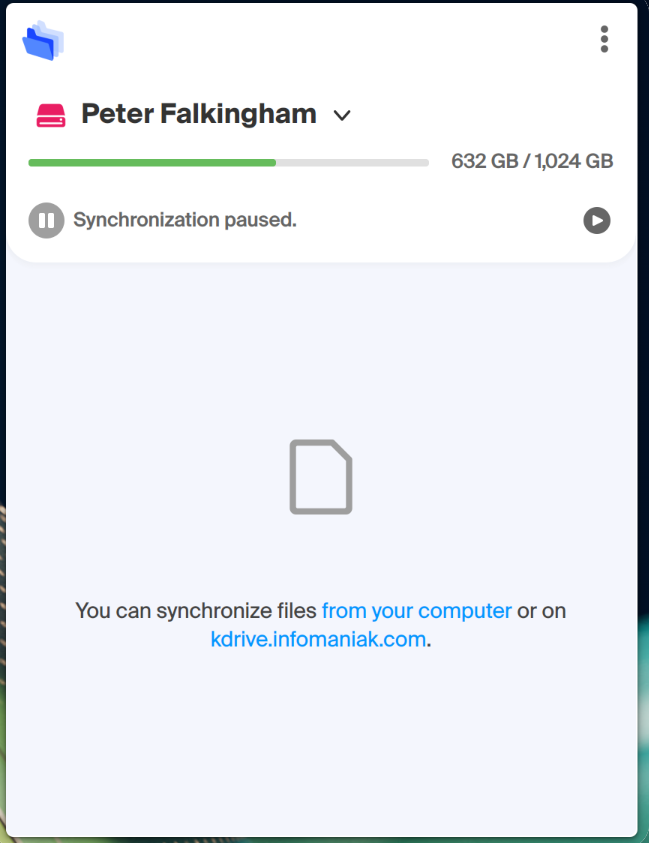
I had a bit of trouble with the sync client at first – it would frequently get stuck, or pause with big files and need restarting. This was concerning, but most of that seems to be ironed out now, and it’s synced 600-700GB without too much trouble on a new Windows machine. What is promising is that I’ve seen full or beta releases of the client come out every week or two, so clearly Infomaniak are putting the effort in, and it does feel more stable now, though it’s not a home run for my point 1. above.
Web and Android app
Managing files through the web is fine – no real difference to OneDrive. The Android app also falls under that category – it backs up camera photos and videos very reliably, and it lets me browse my files pretty quickly (I’d argue file browsing is better than the Android OneDrive app). Viewing photos in the app’s gallery viewer is fundamentally flawed though – first, it only loads one page at a time, so if you want to view a photo from ages ago, and you have 1000’s, that ain’t gonna happen. Secondly, it orders photos by data modified, not date taken which means my recent conversion of my photo collection from JPG to JXL makes sorting by date meaningless. So that aspect needs work – to reliably find photos in web or app, I need to use my folder hierarchy, which is actually mostly fine for me.
Infomaniak’s confusing product structure
Where Infomaniak do need to sort themselves out is there deeply confusing product structure and feature sets. There’s myKsuite, there’s Ksuite Pro, there’s standalone kDrive, kMail, etc, and there’s pricing tiers within these with separate features, and there’s no clear upgrade path between them. I setup mykSuite+ as it felt like the best value for me at the time, and I’ve been happy with that decision so far. But if I want to upgrade to the kDrive offer to get 3TB for a bit more, there’s no way to do that. Apparently I can raise a support ticket and they can help, but it may mean transferring all my data from one kDrive to another.
Another issue is features locked behind tiers. mykSuite+ and kDrive Solo do not include WebDav access, which would alleviate some of the issues I had with the sync client, and give me a path for placeholders on Linux via 3rd party software. but WebDav is available at higher tiers of kDrive, which require multiple individuals, or kSuite Pro, which is an entirely different branch to myKsuite+.
If you’re interested in getting some cloud storage, here’s the range of options:
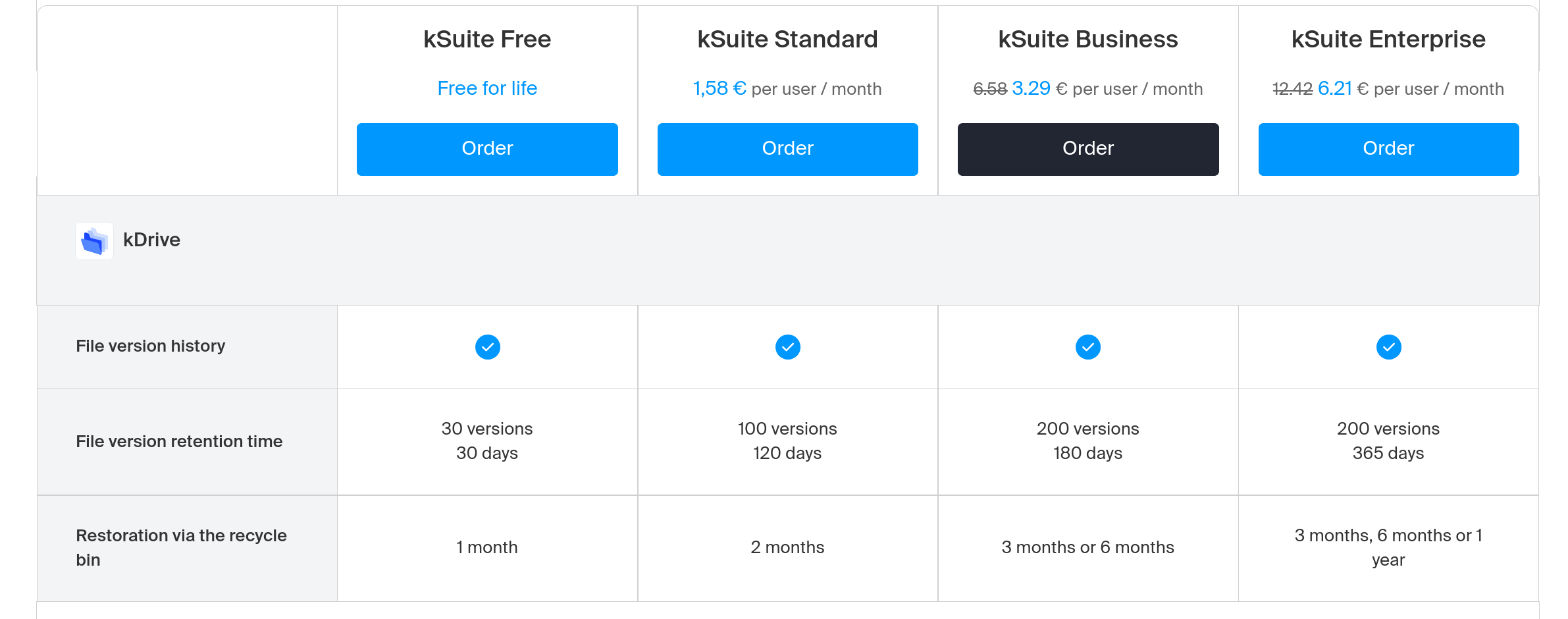
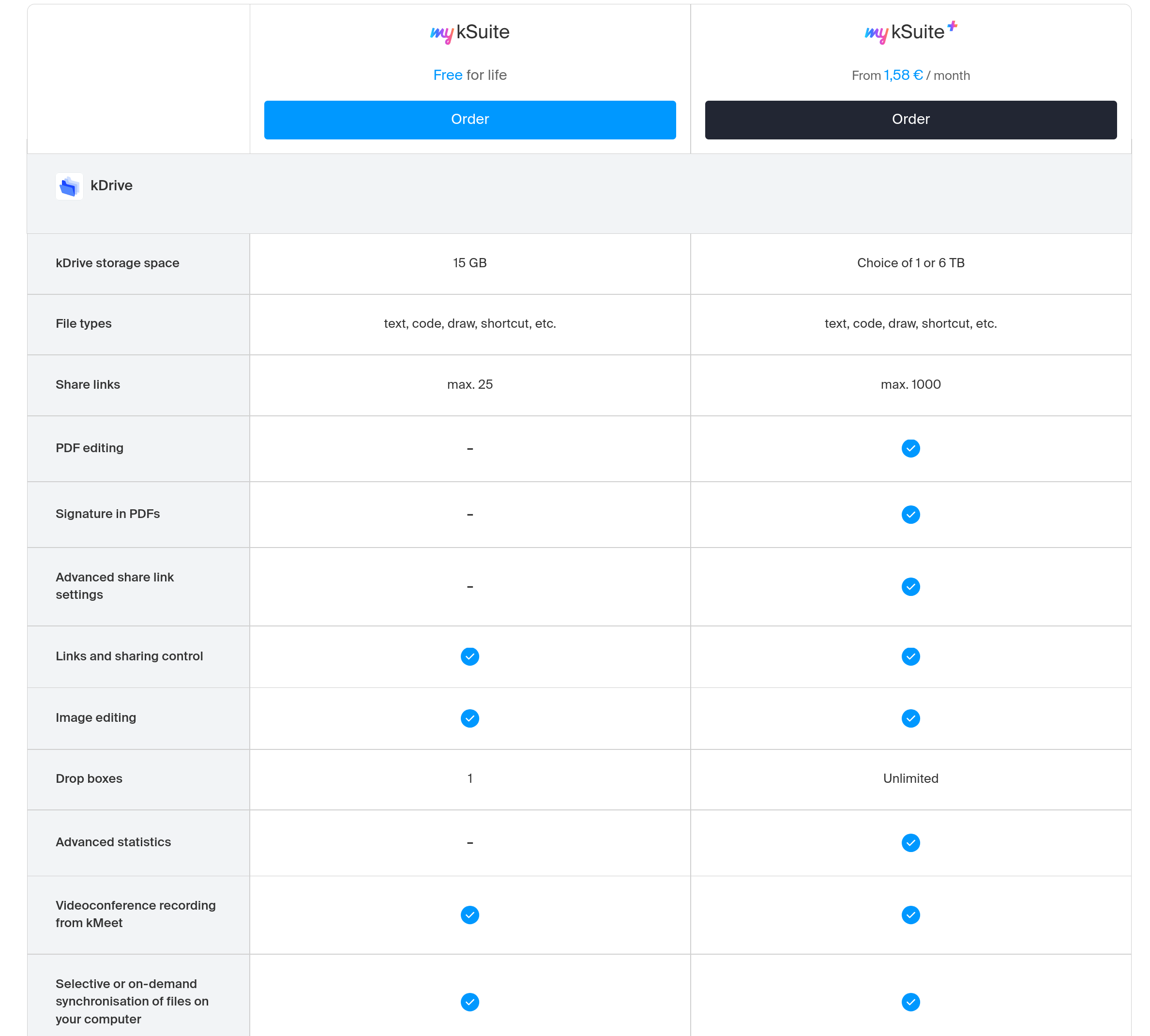
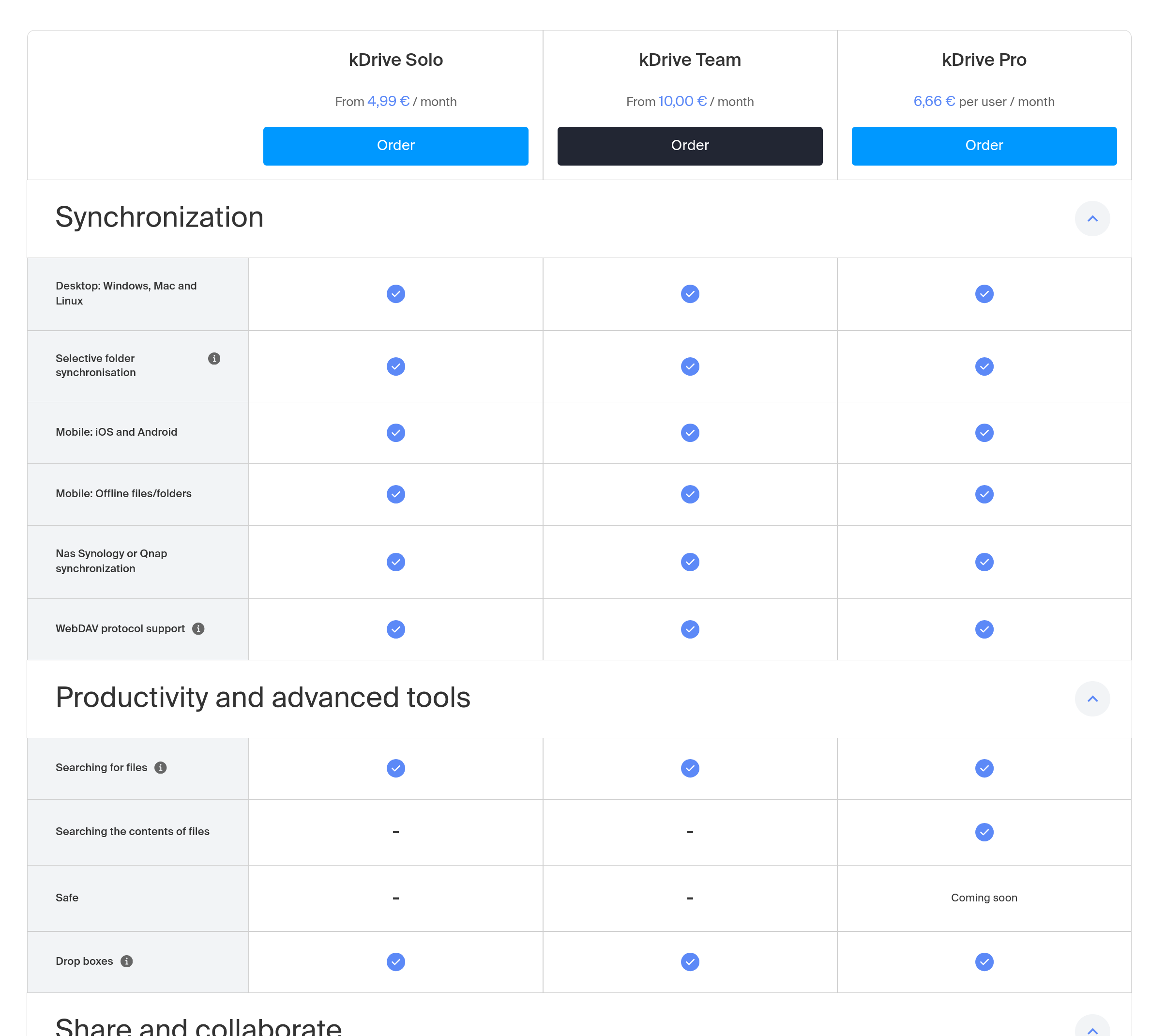
To summarize – that’s 4 versions of kSuite, 2 versions of myKsuite, and 3 versions of kDrive: 9 options to pick from!
I understand there’s a couple of trial versions in there, but that’s a lot of options and tables to choose from if you just want some storage. It’s unnecessarily complex, though their comments in the infomaniak subreddit seem to imply they are aware of this, and may at least make it simpler to transfer from one product to another in the future.
And to be fair, if we take a step back, we can see a lot of those are for multiple users (and of those there’s often a minimum number of users) and the choice really comes down to myKsuite+ or Kdrive Solo if you’re looking for yourself. But then the lack of path between those is frustrating.
Your account is also arranged under an ‘organization’ – I have one organization for the myKsuite+ account, and another organization for something else I set up that has it’s own seperate 15GB kDrive, and they seem wierdly disconnected. Again, it’s all a bit more confusing than it needs to be at this level.
Luckily, it shouldn’t matter too much once you’re all set up.
How to transfer from OneDrive to kDrive
Ok, so you’ve got best part of a terrabyte of personal data. Moving this is scary – what happens if it all goes tits up, and how do you move that much data on less than ideal connections? I did it the slow manual way, and I’m about to try the ‘simple’ way with my wife’s data – I’ll report back on that and edit this post when it’s done.
Firstly though – BACK EVERYTHING UP. For me, I have computers with large drives, and I kept my OneDrive fully synced at all times. That meant it was as ‘simple’ as plugging in an external disk and copying the OneDrive folder to it. The quote marks are there because I initially tried to be clever and use some syncing software that came with my external NAS, and I ended up making a whole bunch of conflicts and the like. I ended up using FreeFileSync to ‘sync’ my OneDrive folders to not just 1, but 2 external drives.
The manual way
Quite simply, I finished opening my Infomaniak account, downloaded the kDrive client and pointed it to a new folder I wanted to sync, then I just moved everything from my copied OneDrive folder on my SSD into the kDrive folder on my PC. It took several days to sync the 700GB, mainly because of the issues I experienced with the kDrive client pausing with large files. It required quite a bit of baby sitting. But once it was all synced, and the client had been updated a couple of times, it was all there and good to go. I’ve not had an issue so far in over a month (touch wood).
The simple way
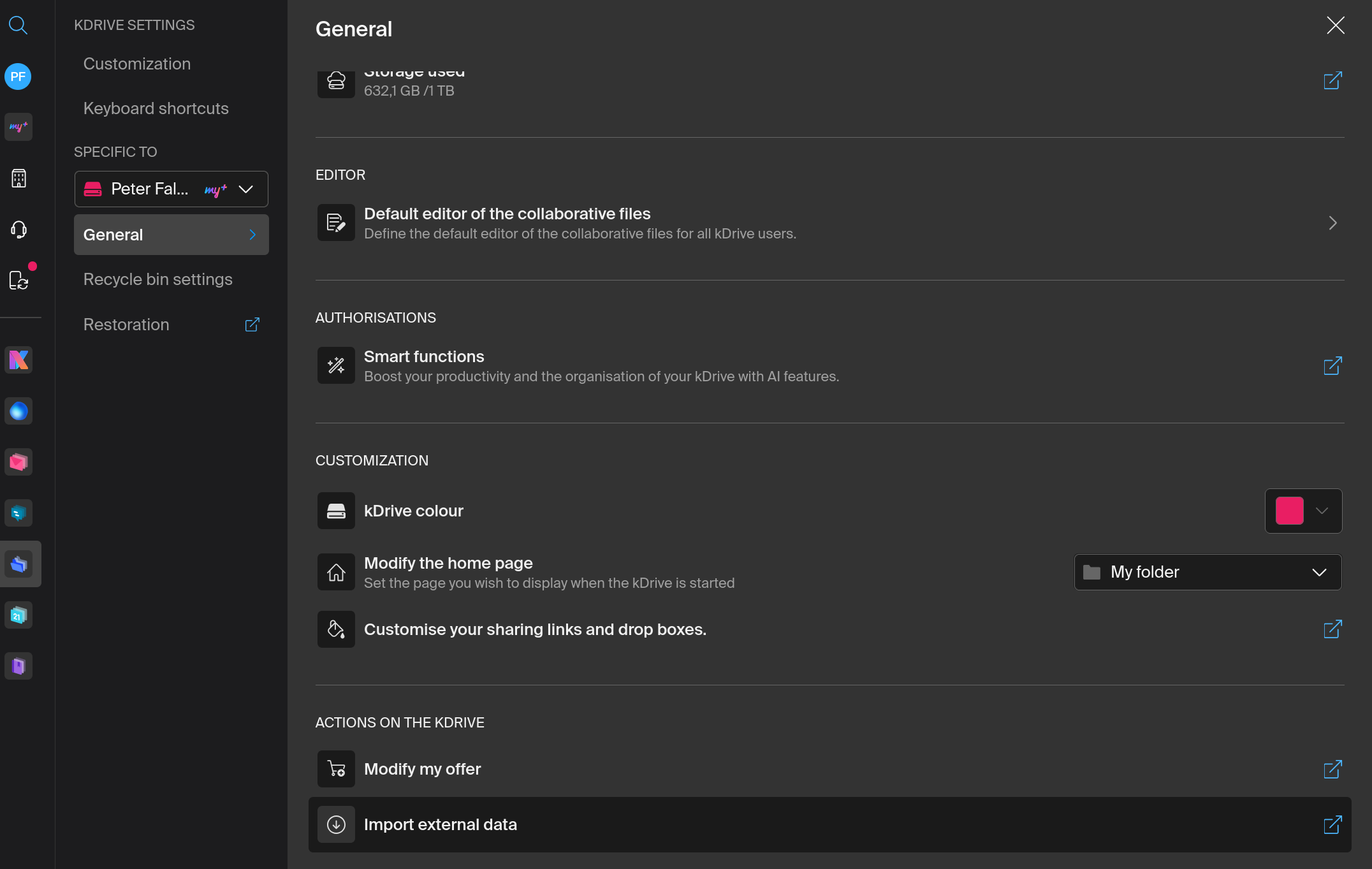
kDrive also offers an option to import from other cloud services. In settings, there’s an “import external data” button:
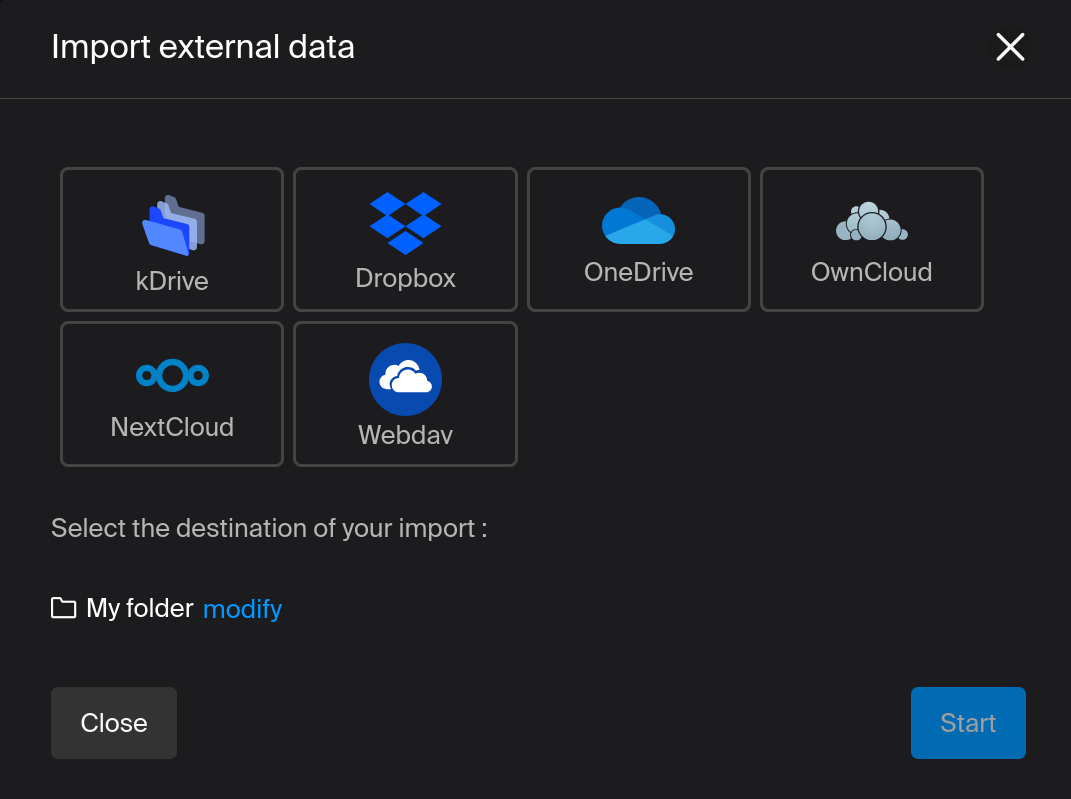
And if you click that, you get an option to pull in data from a variety of other sources:
I’m about to try this, and will edit the post accordingly when it’s done to let you know how it goes. My one concern is that I’ve heard it resets the ‘modified’ date on every file when it’s copied across, and that might cause problems for some.
Key to this entire process though is being able to play with moving this data around safe in the knowledge all your data remains untouched on your backups! If my wife’s transfer causes problems by changing modified dates, we can clear it out and upload from the SSD instead.
Other Infomaniak stuff
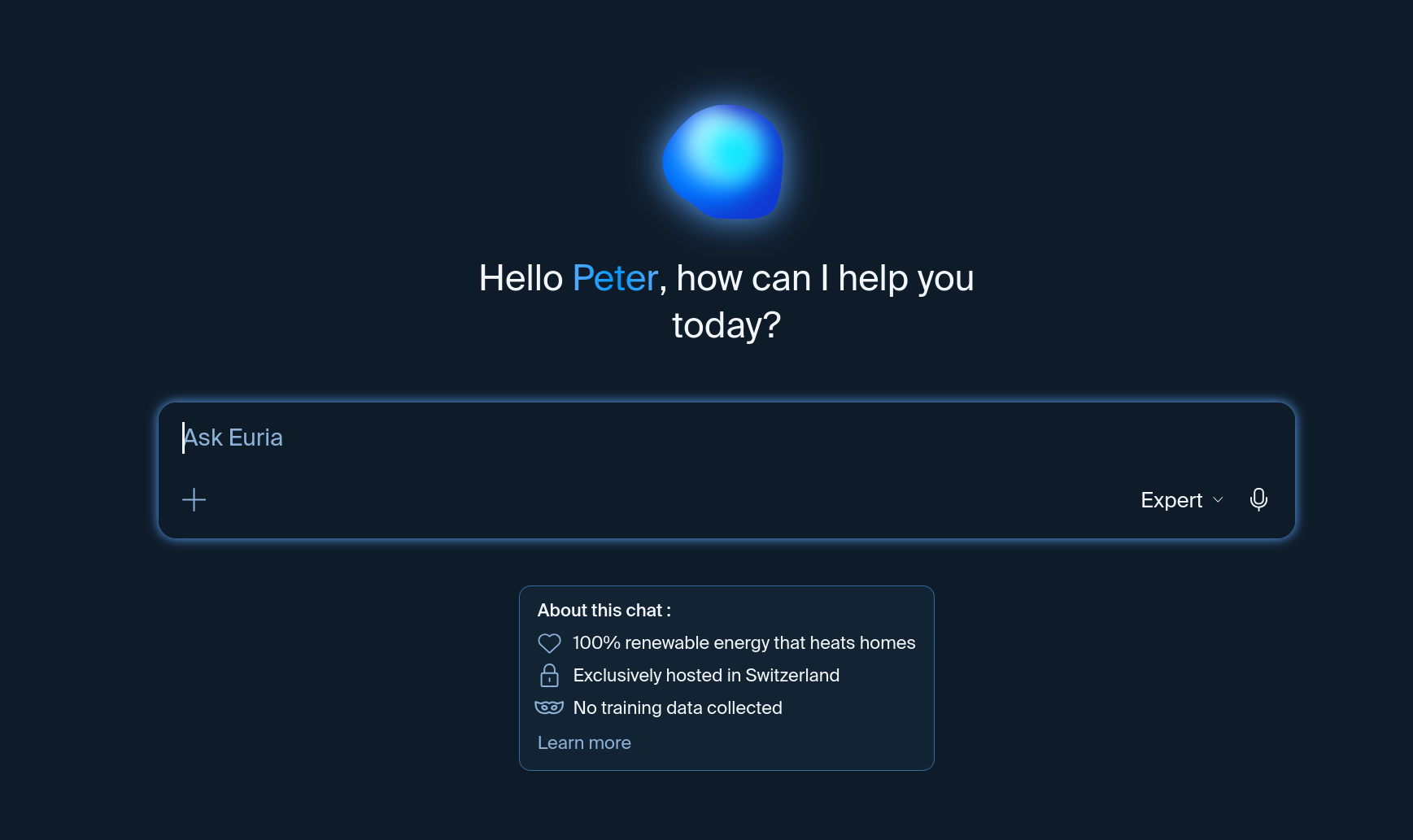
As part of my myKsuite+ subscription, I get access to mail, calendar, chat, and their own AI ‘Euria.’ I’ve used none of these. Euria seems to take the data sovereignty and ethical stuff seriously – powered by renewable energy, hosted in Switzerland, and no collection of data for training:
It is based on DeepSeek I think, if that matters to you. I’ve not had reason to use it yet. I’m not at all concerned about if infomaniak want to integrate it with kDrive – I’ve no qualms about indexing my data with LLMs in this way (it was a perk of OneDrive to be able to search my photos by keywords like ‘trees’ or ‘rivers’).
The mail app is nice on my phone, though I do not need yet another email address for general use, so I only use this really for comms from Infomaniak itself. Still, the mail app works nicely on a folding phone with a 2-pane view, and it’s quick and clear. Couldn’t ask for more. The kDrive and Mail apps also act as 2FA notifiers for security.
Conclusion
I’m a month in to being soley on kDrive now. Let me tell you, pressing ‘delete’ on 700GB of data in OneDrive was scary, even with three backups next to me.
I like what I see so far. I think the company is making the right noises, and the software seems to be improving constantly. I’d like to see Lite Sync on Linux, and I’d like to see the mobile app handle large photo collections much better, but otherwise this is a fantastic deal for cloud storage.
And some links
I also joined their affiliate program, so below is a link you can use to check out their website and give me a small kick back if you do sign up. For what it’s worth I joined the affiliate program because I was writing this post, not the other way around. I’m being effusive because I’m liking the service, and thought I may as well try some affiliate links while I’m at it:
Kdrive:

And infomaniak more generally:

 Prof. Peter L. Falkingham
Leave a comment