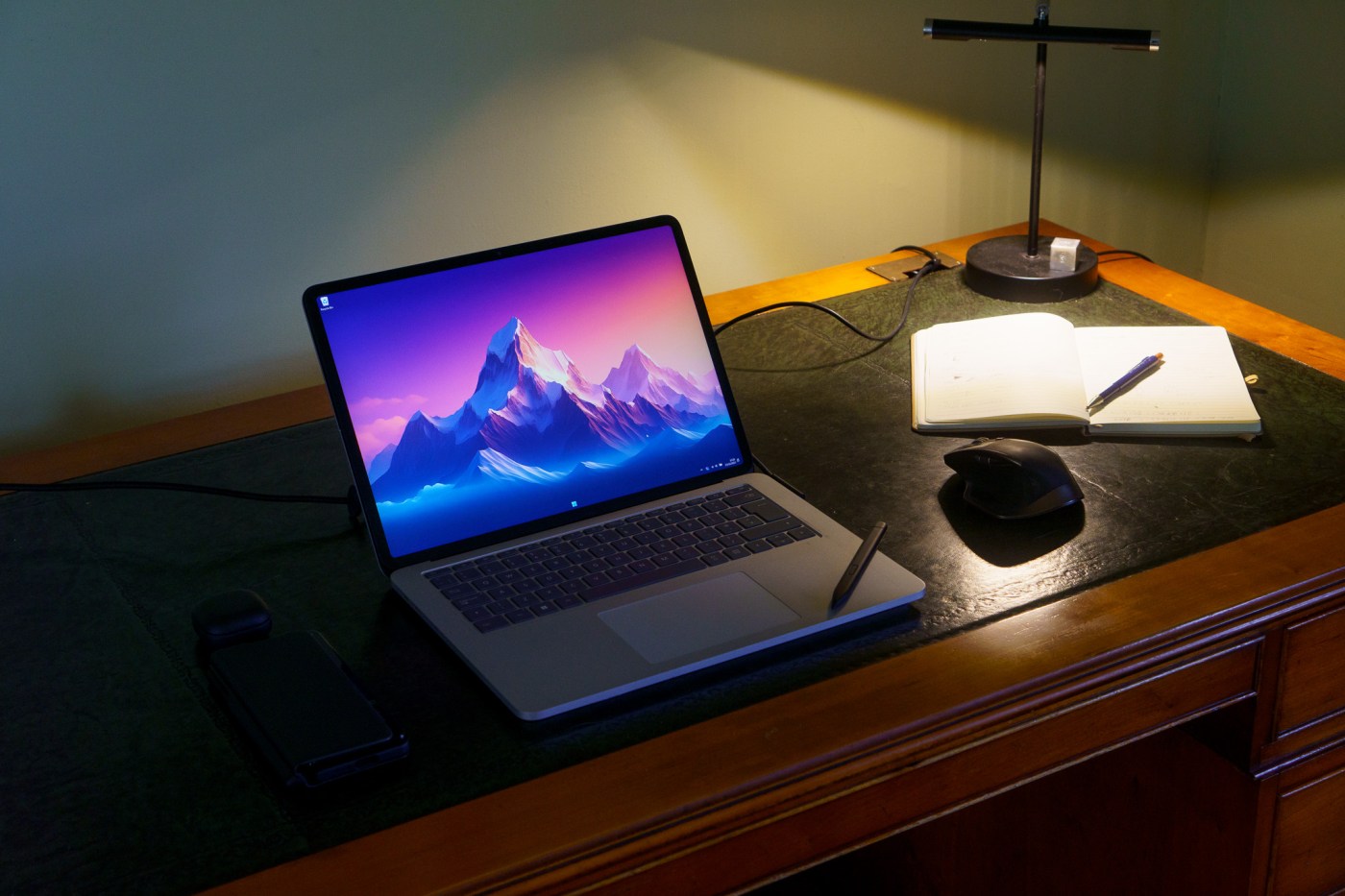
Back in September last year, I wrote a post about the Surface Laptop Studio I’d just bought. I’d only had it a few days at the time, and so it was very much a first impressions post. I’ve now had the device over a year, and with the second gen released just last month, now seems like a good time to take a long hard look at whether this was a good move.
To recap, this was the top-of-the-line model, with an 11th Gen intel i7, 32Gb of RAM, 1TB storage, and an Nvidia A2000. I bought it to replace my ageing desktop as my primary computer at home.
The take home (at the start):
A few points that sum-up my views today: Firstly, when I went back to link to the original post I was genuinely shocked that I’d had the device over a year – I was sure it’d only been a few months. It still feels fresh, looks good, and runs nicely. Secondly, I said at the time the CPU was a weak point, and that’s been as evident as ever during gaming and during simulation/photogrammetry work. It’s not really affected the day-to-day usage of the machine though. Finally, the GPU was not particularly strong, and I very quickly got myself an eGPU with a 3070 Super. Frankly, there’s no way I’d be able to rely only on this machine without that, because I’m GPU bound in most of what I do, whether that’s photogrammetry, rendering, simulating, or whatever. All that being said, I love using the machine.

Moving from a desktop to a laptop as my primary computer
I was super wary of doing this at the time. I’d had a desktop, usually a tablet (Surface Pro, Go, or Pro X), and a phone. When I got the Galaxy Fold 3, it took away the need for a portable tablet for browsing the net stuff, but wasn’t good for working on. So I moved to the laptop over desktop to get that portability for working. My Wife and I share an office, so being able to pick up the computer and move to another room for a meeting works really well, and the same goes for when we want to watch a movie or something.
I did keep a 27″ monitor around, but I barely use it now, much preferring the crisp and clear display of the Surface Laptop Studio. I’ll only get the monitor out for when I’ve got some complex multi-tasking to do, and use the laptop screen as well. Because the 27″ monitor is only QHD (1440p), it doesn’t really show much more on screen than the surface laptop studio at 125% scaling (which is what I generally use), so there’s really little benefit.
It has come into its own on the little field work I’ve done, and when travelling for conferences. It’s a beefy enough laptop that I can do preliminary photogrammetry or edit videos for presentations with ease, something that was harder on the lower-powered Surface tablets I had.
Drawing, pen, and touch
I’m never, ever, going back to a computer without pen and touch if I can help it (that’s one of the big blockers in my moving over to Mac). Being able to whip the pen off the device (held magnetically under the front) to do something as simple as sign a PDF, or as complex as a detailed figure in photoshop, or tracing a photogrammetric model with the grease pencil in Blender, is awesome.
I do wish the display could remain stable at a position between the ‘media mode’, where it’s too steep, and laid flat, where it’s too low.

The Surface Slim Pen 2 has amazing haptics, that make it feel like you’re actually drawing on paper. I really love this, though it’s not available in all programs. I thought I’d hate the shape of the Slim Pen, but the fact is it’s way more ergonomic than even my favourite cylindrical pen, the Rennaisser.
Wear and Tear after a year+
I’ve had the laptop over a year, and it shows very few signs of wear and tear. I take good care of my devices, so that isn’t too surprising, but it has been thrown in a bag for conferences, and it gets moved around the house every day. The keys show no wear, the screen is still perfect (presumably because there’s no anti-glare coating like on a Mac, which tends to see wear, though that’s a mixed blessing given the reflectivity of the SLS screen).
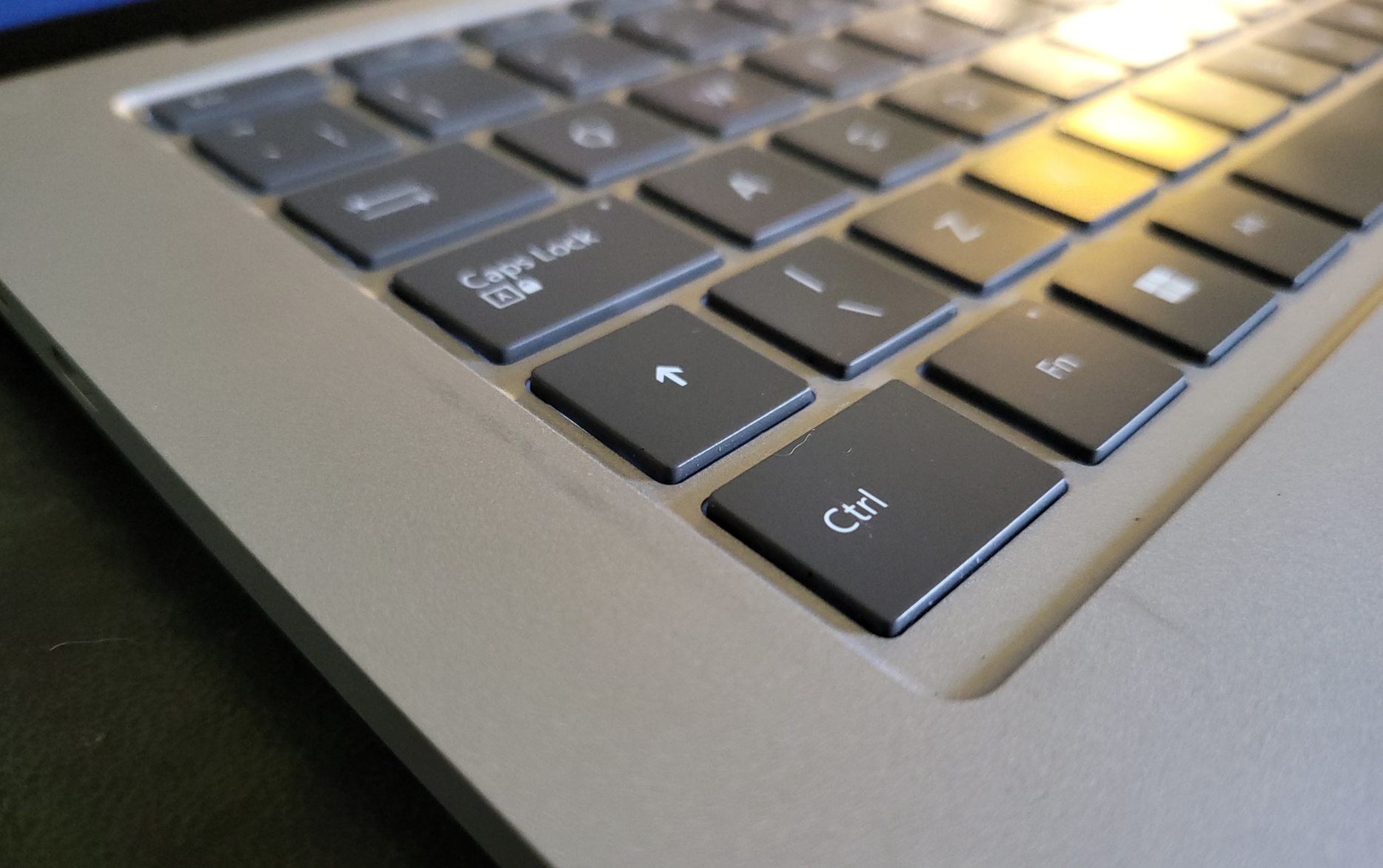
The only place I’ve seen any wear is where the screen attaches magnetically in media mode, where a faint grey mark that won’t rub off has appeared next to ctrl/shift/capslock
Performance
I summed up the performance at the start, but here’s some more details on where it’s affected me:
The eGPU has solved most of my problems. I’ll start with gaming because that’s the most clear-cut indication of performance. High-end gaming has, for the most part, been flawless with the eGPU attached. I’m currently making my way through Baldur’s Gate 3 at native resolution (with DLSS), and it’s hitting 80-90fps. The only games I’ve had issues with are the two I did initial testing of performance with, Hitman 3 and Cyberpunk 2077, and in both cases I was severely CPU bound. I know this, because if you turn off physics in Hitman 3, framerates skyrocket, while in Cyberpunk, even if you turn on full path tracing, the framerate doesn’t drop, implying it is where it is not because of the GPU, but because of that weak little 4-core CPU.
I simply can’t entertain the idea of running my particle simulations, even small ones, on this device. While the 32GB of RAM would be great, the particle sims are massively parallel, and scale almost linearly with number of cores. 4 is not enough.
Rendering in Blender has been great though, the CPU keeps up, and even the internal Nvidia A2000 gpu is enough for rendering individual frames fairly quickly. Add the 3070 eGPU and it flies. Similarly, photogrammetry, mainly Reality Capture, is almost entirely GPU limited in most cases, and both it and Metashape can use all GPUs in the device, so they absolutely fly with the eGPU attached, and perform fine for small datasets, or just aligning cameras in the field.
For day to day work though, it flies. Office applications, Adobe Suite, all open quickly and behave responsively. And I adore being able to quickly move windows around and fling them to the edges of the screen to invoke snap, by using touch.
Would I get a Gen 2?
Probably. The gen 2 is a little thicker, which is disappointing, but it has a 13th gen processor with 14 cores (6 performance, 8 efficiency), which would alleviate many of the CPU issues I have, and it has an Nvidia 4060, which would probably let me get rid of the eGPU (which isn’t a big deal, but it does use more energy, and is slightly a faff having to remember to plug it in before I get started on something that needs it. The new model also has a USB A port, though I’ve now got a USB-C to A adapter for the one thing I still use USB-A for, my camera. The new SLS also has an SD card slot, which is great, but again, I have an adaptor for my camera. So it’s a big improvement in basically the same high-quality body and screen.
However, the top-end SLS2 is over £3k, even with an educational discount. I got the first gen second hand from CEX for less than half that.
You can buy a lot more power in a laptop, and significantly more power in a desktop for the same price. However, the pen and touch, the form factor, and the build quality really are about the best in class with the SLS as I’ve seen anywhere, really getting close to the premium feel of the new Macs, while providing access to Nvidia GPUs which at least for now are the definitive choice for gaming, photogrammetry, rendering, and other workflows.
I’ll wait for a bargain for a Gen 2, but I think it’s basically my ideal computer at the moment, and I have far fewer reservations today, after a year of use, than I did shortly after buying it.

 Prof. Peter L. Falkingham
This was a great long-term review of the original Surface Laptop Studio, Prof. Falkingham! I had the 16gb, 512gb version of the first SLS for about a year and a half. I wanted to get the newer version of the SLS but, like you, could not justify the higher cost. Only when the price dropped $400 in the United States last month with an estimated trade-in of $650 did I decide to purchase the newer version. I opted for the 32gb, 1tb version for the upgrade. The performance is better than the first SLS. The aluminum body (versus the magnesium alloy used in the first SLS) may help to hide the marks from moving the device to studio mode. I also added thin pieces of felt to the bottom of the screen to prevent scratches. Thank you for your review!
UK tends not to have good trade ins, so I’m hanging in there for a used top-end SLS2. Good call on the thin peices of felt!
How much extra performance do you feel you’re gettting? And does the thicker body make a difference?
I have noticed the newer SLS does not slow down as much. Prior to returning the first SLS (16 GB, Intel Core i7-11370H, Nvidia GeForce RTX 3050 Ti), I found these test results from Geekbench 5:
Single Core – 1531
Multi Core – 5550
GPU OpenCL – 61311
For the SLS2 (32 GB, Intel Core i7-13700H, Nvidia GeForce RTX 4050), these are the results from Geekbench 6:
Single Core – 1601
Multi Core – 9369
GPU OpenCL – 77750
Although these are not huge improvements based on the tests, the newer model seems to perform better. I did increase the RAM memory with the SLS2.
I have the first Gen. Edu discount too. Entry level specs. I’ll reiterate one thing and add another. The price is ridiculous imo. It’s almost as if they are charging apple prices to “compete” with apple products. In no way are these laptops worth their value even when heavily discounted which they never are. One oddity for me is a suitable carrying case. Replacing a desktop is one thing. Going to a coffee shop or favorite spot to focus is another. I have yet to find something I trust other than the box it came in. The laptop is heavyyyy. The price makes me nervous about damaging it in transit. As of right now I’m looking at a Thule/ pelican option with a trakke bag. So I don’t look like a weirdo pulling the box out in the middle of a Starbucks.
For travel, I’ve always just thrown it in a backpack that has a laptop sleeve in it, and it’s been fine. I think it’s fairly tank-ish in build. But I don’t travel with it every day, I have a desktop at work, and only take this with me when travelling, rather than when commuting.
what? i just put mine in the laptop pocket in my backpack. you… carry the box around with you???